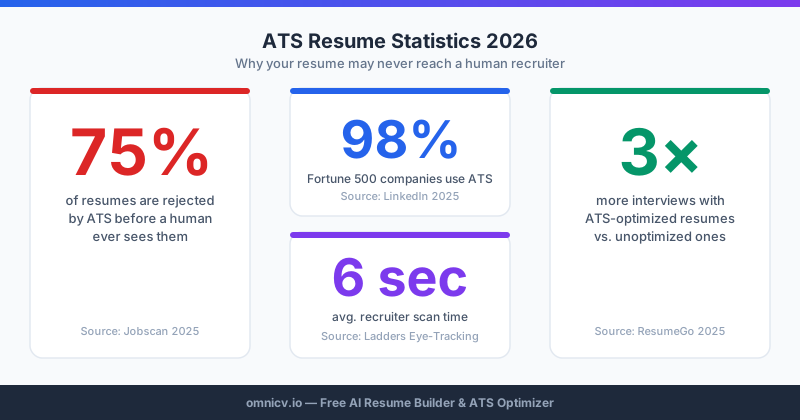
Over 98% of Fortune 500 companies and 75% of all employers now use Applicant Tracking Systems to filter resumes before a human ever reviews them. In 2026, ATS platforms have grown significantly more sophisticated — incorporating machine learning, semantic analysis, and behavioral scoring to rank candidates. Yet the fundamental rules remain unchanged: clean formatting, strategic keywords, and tailored content win every time.
If you have been submitting applications without callbacks, the problem likely is not your qualifications — it is your resume's ATS compatibility. This guide gives you the most current, research-backed strategies to get past the bots and into the interview room.
What Is an ATS and How Has It Evolved in 2026?
An Applicant Tracking System (ATS) is software that automates the early stages of recruitment. When you submit a resume online, it enters the ATS, which parses your document into structured data, extracts keywords, scores your resume against the job description, and ranks you against other candidates.
Major ATS platforms in 2026 include Workday, Greenhouse, Lever, iCIMS, Taleo, and BambooHR. Each has unique parsing logic, but they share common requirements that, when met, dramatically improve your chances of being seen by a human recruiter.
The key evolution in 2026: ATS platforms now use Natural Language Processing (NLP) to understand context, not just exact matches. However, research from Jobscan's 2025 Optimization Report confirms that exact keyword matches still outperform semantic equivalents in scoring. Do not assume the ATS will infer what you mean — state it explicitly.
Tip 1: Choose the Right File Format
This is the most commonly overlooked ATS factor. In 2026:
✅ .docx (Microsoft Word) is the gold standard — ATS systems parse Word XML structures most accurately
✅ Clean PDF (generated from Word, not from design software) is widely accepted
✅ Always check the job posting for format preferences — follow them exactly
❌ Image-based PDFs (scanned documents) are unreadable to ATS
❌ .pages, .odt, or Google Docs links cause immediate rejection
❌ Canva exports and graphic-heavy PDFs frequently fail parsing
OmniCV's AI resume builder exports ATS-ready files in both formats, ensuring compatibility without manual formatting guesswork.
Tip 2: Use a Single-Column Layout
Multi-column resume designs look impressive to humans but cause catastrophic ATS parsing errors. Most parsers read left to right across the full page width — so a two-column layout merges your right column into the middle of your left column's sentences.
✅ Single-column layout throughout the main body
✅ Clear visual hierarchy using font sizes, not columns
✅ White space between sections for clean parsing boundaries
❌ No two-column or three-column layouts
❌ No text boxes, tables used for layout, or sidebars
❌ No headers or footers containing critical contact information
Tip 3: Use Standard Section Headings
ATS systems identify your resume sections using keyword detection. Unconventional headings confuse the parser and cause your content to be misclassified or skipped.
✅ "Work Experience" or "Professional Experience"
✅ "Education"
✅ "Skills" or "Technical Skills"
✅ "Certifications"
✅ "Summary" or "Professional Summary"
❌ "My Journey" instead of "Work Experience"
❌ "Academic Background" instead of "Education"
❌ "Core Competencies" as a standalone section name (use "Skills")
❌ "About Me" for a professional summary
Tip 4: Extract and Mirror Job Description Keywords
Keywords are the currency of ATS scoring. The system compares your resume against the job description word by word, phrase by phrase. Exact matches score higher than semantic equivalents.
How to find the right keywords:
Where to place keywords for maximum impact:
The right way to use keywords:
✅ Mirror exact phrasing: if the job says "project management," use "project management" — not "managed projects"
✅ Include both acronyms AND full forms: "Search Engine Optimization (SEO)"
✅ Place keywords naturally within achievement statements
✅ Update keywords for every application — a one-size resume fits none
❌ Never copy-paste the job description verbatim
❌ Never use white text on white background to hide keywords — ATS systems detect and penalize this
❌ Never stuff keywords unnaturally — modern ATS systems flag keyword spamming
Tip 5: Use Standard Fonts at Readable Sizes
Font choice affects both ATS parsing accuracy and human readability.
✅ Arial, Calibri, Garamond, Georgia, Helvetica, Times New Roman
✅ Body text: 10–12pt; Section headers: 14–16pt
✅ Consistent font throughout the document
❌ Decorative, script, or display fonts
❌ Font sizes below 9pt or above 20pt
❌ Mixing multiple font families
Tip 6: Write a Powerful, Keyword-Rich Professional Summary
Your professional summary is the most strategically valuable real estate on your resume. It is read first by both the ATS and the human recruiter, making it your highest-leverage optimization target.
A strong ATS summary includes:"Experienced professional seeking challenging opportunities in a dynamic organization."
ATS-optimized example:"Digital Marketing Manager with 8 years of experience in B2B SaaS demand generation, specializing in SEO strategy, marketing automation, and paid acquisition. Proven record of scaling organic traffic 200%+ and reducing customer acquisition cost by 35% through data-driven content programs. Proficient in HubSpot, Salesforce, Google Analytics 4, and Marketo."
The second version contains: job title, years of experience, industry context, five platform-specific keywords, two quantified achievements — all in three sentences.
Tip 7: Quantify Every Achievement You Can
Numbers are the most powerful elements on a resume. They stand out to ATS scoring algorithms and immediately impress human reviewers. In 2026, ATS systems are increasingly configured to recognize and weight quantified impact metrics.
Quantify using:
If you lack exact numbers, use ranges: "managed a budget of approximately $500K" or "served a client base of 200+ accounts."
Tip 8: Build a Strategic, Tailored Skills Section
Your Skills section is a dedicated keyword zone. In 2026, the highest-scoring skills sections are:
A static skills list that never changes is one of the most common high-impact ATS mistakes. Treat your skills section as a live document — update it for every application.
Tip 9: Use Consistent Date Formatting
Inconsistent or ambiguous dates confuse ATS parsers trying to calculate your total years of experience.
✅ "January 2022 – March 2024" (written out)
✅ "01/2022 – 03/2024" (numeric)
✅ "Jan 2022 – Mar 2024" (abbreviated)
Choose one format and use it consistently throughout. Never mix formats within a single document.
For current roles: "January 2024 – Present"
Tip 10: Test With an ATS Checker Before Submitting
Never submit a resume without testing it against the target job description. ATS checkers simulate how the system will parse and score your resume, giving you actionable data before it matters.
What to look for in your ATS report:
OmniCV's integrated ATS checker provides instant scoring and keyword gap analysis against any job description — the same kind of feedback that previously required expensive resume writing consultants.
Advanced ATS Tips for 2026
Handle Employment Gaps Proactively
Some ATS systems automatically flag large employment gaps. Add a brief, factual notation for significant gaps: "Career break — professional development and freelance consulting (2024–2025)."
Match Your Job Title to the Posting
If your official title was "Growth Hacker" but the industry standard is "Digital Marketing Manager," include the standard title in your summary or description. The official title matters for background checks; the industry-standard equivalent matters for ATS matching.
Include LinkedIn in Your Contact Information
87% of recruiters use LinkedIn to vet candidates who pass ATS screening. A LinkedIn URL in your contact section signals professionalism and provides an immediate way for the human reviewer to learn more about you.
Apply Early When Possible
Some ATS platforms apply a time-based weighting that favors early applicants. A well-optimized resume submitted within the first 48 hours of a posting has a measurably higher callback rate than the same resume submitted two weeks later.
The ATS Optimization Checklist
Run through this before every submission:
File and Format✅ Saved as .docx or clean PDF
✅ Single-column layout
✅ Standard fonts at 10-12pt
✅ No graphics, text boxes, or tables for layout
✅ Contact information in the main document body
Keywords and Content✅ Professional summary includes target job title + 4-6 keywords
✅ Skills section tailored to this specific job description
✅ Achievements quantified with numbers and percentages
✅ Acronyms spelled out on first use
✅ Dates formatted consistently throughout
Optimization✅ ATS match score of 75%+ verified
✅ Copy-paste test performed (paste into Notepad and verify readability)
✅ No spelling or grammar errors
✅ File named: FirstName_LastName_Resume.docx
The difference between a resume that gets interviews and one that disappears into the void is rarely about qualifications — it is almost always about optimization. With the right strategy and tools like OmniCV's AI-powered ATS checker, you can ensure your genuine qualifications are never filtered out before a human has the chance to evaluate them.