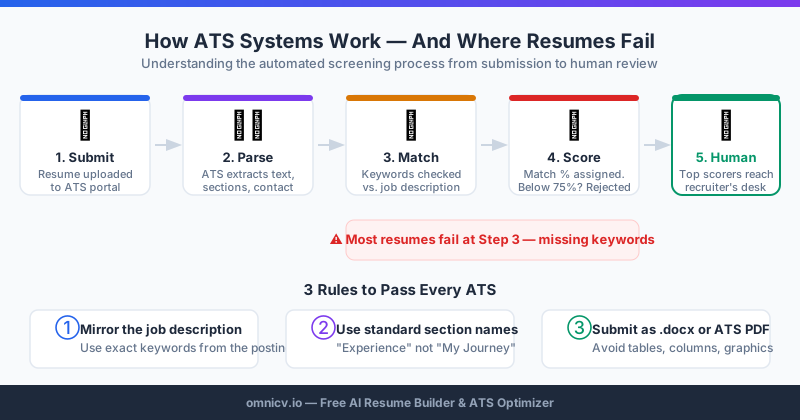
When you submit a job application online, your resume almost never goes directly to a human recruiter. Instead, it enters an Applicant Tracking System (ATS) — sophisticated software that acts as a digital gatekeeper between your qualifications and the person who could hire you. According to a 2025 report from the Society for Human Resource Management (SHRM), over 99% of Fortune 500 companies and approximately 75% of all employers use ATS software in their hiring process.
The result: 75% of resumes are rejected before a human sees them — not because the candidates are unqualified, but because their resumes fail automated screening. This comprehensive guide explains exactly how ATS systems work in 2026 and gives you a step-by-step framework to ensure your resume passes every time.
How ATS Systems Actually Work: The Complete Technical Picture
Understanding the mechanics of ATS scoring transforms your approach to resume writing from guesswork into a precise, repeatable process.
Stage 1: Document Parsing
The moment you submit your application, the ATS performs parsing — converting your resume file into structured, searchable data. The system extracts:
Stage 2: Keyword Extraction and Matching
After parsing, the ATS extracts keywords from your resume and compares them against the job description. This is where most optimization happens. The system looks for:
Stage 3: Scoring and Ranking
Every candidate receives a numerical score representing their match percentage against the job description. Recruiters typically see a ranked list of candidates with their scores — many organizations only manually review candidates above a set threshold (often 65-75%).
Scoring factors vary by ATS platform but generally weight:
Stage 4: Filtering and Routing
Based on scores and recruiter-defined rules, the ATS automatically filters candidates into categories: advance to review, hold, or reject. In high-volume hiring scenarios at large companies, candidates below threshold scores may never receive human attention at all.
The Five Most Critical ATS Success Factors
Factor 1: Document Format and Structure
The foundation of ATS success is a document the system can actually read.
File Format Rules:✅ .docx (Microsoft Word) — most universally compatible
✅ Clean PDF generated from Word — widely accepted
✅ Follow employer format instructions precisely when provided
❌ Image-based PDFs (scanned documents)
❌ Apple Pages (.pages) files
❌ Canva, Adobe Illustrator, or design-tool exports
❌ Google Docs links (unless the employer specifically requests)
Layout Rules:✅ Single-column layout for the entire document
✅ Standard section headings (Work Experience, Education, Skills)
✅ Simple bullet points (•) — not custom symbols or icons
✅ Body text in the main document area — not in headers or footers
✅ Left-aligned text throughout
❌ Multi-column layouts — columns get merged into unreadable text
❌ Text boxes — content is invisible to most parsers
❌ Tables used for layout purposes
❌ Decorative borders, lines, or dividers that interrupt text flow
❌ Graphics, photos, icons, or skill bar charts
Factor 2: Contact Information Placement
A surprisingly common reason for ATS failures: contact information placed in the document header. Many ATS systems skip header content entirely, meaning your email address — the primary way recruiters contact you — may never be captured.
Place in the main document body:Factor 3: Keyword Strategy
Identifying the right keywords:The most effective keyword research starts with a close reading of the target job description. Extract:
Repeat this across 3-5 similar job postings to identify which keywords appear universally — these are your highest-priority targets.
Keyword placement hierarchy:If the job description says "customer relationship management," use that exact phrase — not "managing client relationships." If it says "React.js," write "React.js," not "React" or "ReactJS." ATS systems in 2026 still weight exact matches significantly higher than semantic equivalents.
Include acronyms AND full forms:Write "Search Engine Optimization (SEO)" at first use — some ATS systems match on the acronym, others on the full phrase.
Factor 4: Work Experience Section Optimization
Your work experience bullets must work on two levels: pass ATS keyword screening and impress the human who reads them afterwards.
The winning formula for every bullet point:Action Verb + Specific Activity + Measurable Result
Examples:
The strong version contains: platform name (keyword), specific metric, timeframe, methodology, and business impact — all elements that both ATS systems and human readers respond to positively.
Quantification guide:Factor 5: Skills Section Architecture
The Skills section is your highest-density keyword zone. Structure it for maximum ATS impact:
Organize by category:Update your skills section for every application — remove skills irrelevant to the role and add relevant ones you genuinely possess.
The ATS-Friendly Resume Structure: Section by Section
Professional Summary (2-4 sentences)
Work Experience (chronological, most recent first)
Skills
Education
Certifications
Testing Your Resume Before Submission
Never submit without testing. Two methods:
Method 1: The Copy-Paste Test
Select all text in your resume (Ctrl+A), paste into Notepad or another plain text editor. The result represents approximately what the ATS "sees." Verify:
Method 2: ATS Simulation Tool
Tools like OmniCV's ATS checker simulate real ATS parsing and scoring against a specific job description. You receive:
Target a score of 75%+ before submitting. Use the gap analysis to make targeted improvements.
Common ATS Mistakes That Cost You Interviews
Formatting mistakes:❌ Multi-column layouts (the #1 ATS failure cause)
❌ Contact info in document headers/footers
❌ Text boxes or tables for layout
❌ Graphics, icons, or photos of any kind
❌ Fancy or decorative fonts
Content mistakes:❌ Generic, untailored resume for every application
❌ Acronyms without spelled-out forms
❌ Vague responsibility statements without quantified outcomes
❌ Functional resume format (ATS systems handle chronological formats best)
❌ Irrelevant experience that dilutes keyword density
Strategic mistakes:❌ Applying with a one-size-fits-all resume
❌ Not testing ATS compatibility before submitting
❌ Using creative job titles instead of standard industry equivalents
❌ Skipping the skills section or treating it as static
Industry-Specific ATS Considerations
Technology Roles
Prioritize specific technology names with version numbers where relevant. Include both the technology name and its ecosystem ("React" and "React.js" and "Next.js"). Open source contributions with quantified impact score highly. GitHub profile URL should appear in contact info.
Finance and Accounting
Regulatory knowledge keywords carry significant weight: GAAP, IFRS, SOX compliance, Basel III. Certifications must appear with exact official designations: CPA, CFA Level II, CMA. Software proficiency: Bloomberg Terminal, SAP FI, Oracle Financial.
Healthcare and Clinical
License and board certification keywords are often mandatory filters. Include your license number, NPI, and all active credentials with their exact official styling. HIPAA compliance, EMR/EHR system names, and specialty certifications should all appear explicitly.
Marketing
Data and analytics skills now appear in over 78% of marketing job postings. Platform certifications (Google Analytics Certified, HubSpot Inbound, Meta Blueprint) signal currency. Performance metrics (CPA, ROAS, MQL/SQL, NPS, churn rate) demonstrate results orientation.
Your Pre-Submission ATS Checklist
Before every application:
Format verification:✅ Single-column .docx or clean PDF format
✅ All contact info in main document body
✅ Standard section headings throughout
✅ No graphics, tables (for layout), or text boxes
Keyword verification:✅ Professional summary includes target job title + keywords
✅ Skills section updated for this specific role
✅ Top 10 job description keywords present in resume
✅ Acronyms expanded on first use
Quality verification:✅ ATS match score 75%+ confirmed
✅ Copy-paste test passed
✅ Achievements quantified with numbers
✅ No typos or grammatical errors
✅ File named: FirstName_LastName_Resume_RoleName.docx
ATS optimization is a learnable, repeatable skill. Every variable — format, keywords, structure, quantification — is within your control. With the right process and tools, you can consistently pass automated screening and put your qualifications in front of the people who actually make hiring decisions.